Table of Contents
ToggleIntroduction
A noisy office or busy call center can make communication difficult. Background conversations, keyboards, air conditioners, phones, and other workplace sounds can affect how clearly employees hear and speak during calls. This is where noise-cancelling headsets can make a real difference.
For IT managers, procurement managers, business executives, call centre managers, and office managers, choosing the right headset involves more than looking for the words “noise cancelling.” Microphone quality, comfort, connectivity, battery life, compatibility, and durability all matter.
In this guide, we explain how noise-cancelling headsets work, what to look for, the difference between wired and wireless models, and how to choose the right headset for an office or call center.
Table of Contents
- Introduction
- What Are Noise-Cancelling Headsets?
- Why Noise-Cancelling Headsets Matter in Offices and Call Centers
- ANC vs Noise-Cancelling Microphones
- Wired vs Wireless Call Center Headsets
- Key Features to Look for in a Noise-Cancelling Headset
- Best Noise-Cancelling Headsets for Offices and Call Centers
- How to Choose the Right Headset for Your Team
- Common Mistakes to Avoid When Choosing a Call Center Headset
- Best Practices for Using Headsets in Call Centers
- Future Trends in Business and Call Center Headsets
- Conclusion
- FAQs
What Are Noise-Cancelling Headsets?
Noise-cancelling headsets are designed to reduce unwanted background sound so users can hear conversations more clearly and communicate with less interference. Depending on the model, they may use passive noise isolation, Active Noise Cancellation (ANC), microphone noise cancellation, or a combination of these technologies.
This makes them particularly useful in busy environments such as offices, call centers, customer service departments, meeting rooms, and shared workspaces.
However, “noise cancelling” can mean different things.
Some headsets are designed mainly to reduce the sound reaching the person wearing them. Others focus on reducing background noise picked up by the microphone. Some professional headsets do both.
What does noise cancellation do?
Noise cancellation can help reduce distractions caused by:
- Nearby conversations
- Keyboard sounds
- Office equipment
- Air conditioning
- Traffic
- General background noise
- Other employees taking calls
For an employee working in a busy call center, this can make it easier to concentrate on a customer conversation.
For the customer on the other end, a good noise-cancelling microphone can make the employee’s voice easier to understand.
Quick facts about noise-cancelling headsets
- ANC primarily helps reduce sound heard by the headset wearer.
- A noise-cancelling microphone helps reduce unwanted background sound transmitted during calls.
- Wired headsets do not require battery charging.
- Wireless headsets offer greater freedom of movement.
- Binaural headsets cover both ears.
- Monaural headsets leave one ear open to the surrounding environment.
- USB headsets are commonly used with computers and softphones.
- Bluetooth headsets are useful for employees who need to connect to multiple devices.
Therefore, the best headset depends on the environment and how employees communicate.
Why Noise-Cancelling Headsets Matter in Offices and Call Centers
Noise-cancelling headsets matter because background noise can affect both concentration and communication. In an office, employees may have to speak over conversations and equipment. In a call center, several agents may be talking at the same time, making microphone performance especially important.
The challenge of noisy offices
Open-plan offices are designed to encourage collaboration, but they can also create a lot of background noise.
Common sources include:
- Conversations between employees
- Phone calls
- Keyboard and mouse sounds
- Printers
- Air conditioning
- Office machinery
- People walking around
- Meetings taking place nearby
When an employee spends several hours on calls, these distractions can become frustrating.
A headset with effective noise reduction can help the employee focus on the conversation rather than constantly reacting to surrounding sounds.
Why call centers need good microphones
Call centers have a slightly different requirement.
It is not enough for an agent to hear the customer clearly. The customer also needs to hear the agent clearly.
Imagine an agent speaking to a customer while five other agents are talking nearby. If the microphone captures all those voices, the customer may struggle to understand the conversation.
This is why a call center headset with a noise-cancelling microphone can be particularly useful.
Noise cancellation and productivity
Noise reduction can also help employees stay focused in shared environments.
This is particularly relevant for:
- Customer service teams
- Sales teams
- IT support teams
- Receptionists
- Remote workers
- Hybrid employees
- Business executives
- Contact center agents
However, noise cancellation should not be viewed as a replacement for good office design. Proper workspace planning, acoustic treatment, employee training, and appropriate headset selection can all contribute to better communication.
ANC vs Noise-Cancelling Microphones
ANC and microphone noise cancellation are not the same thing. ANC reduces unwanted sound that reaches the wearer, while a noise-cancelling microphone is designed to reduce background noise picked up during a call. Professional headsets may use both technologies.
Understanding this difference can prevent procurement teams from buying the wrong equipment.
What is Active Noise Cancellation?
Active Noise Cancellation, commonly called ANC, uses microphones and electronic processing to detect surrounding sounds and produce an opposing signal that reduces those sounds.
ANC can be particularly useful for continuous background sounds such as:
- Air conditioners
- Fans
- Traffic
- Low-frequency machinery
- General office noise
However, ANC does not mean that every surrounding sound will disappear.
What is a noise-cancelling microphone?
A noise-cancelling microphone focuses on the sound being transmitted to the other person.
Its purpose is to capture the user’s voice while reducing unwanted sounds around them.
This is especially important for call center employees.
For example, if an employee is speaking while another employee is having a conversation nearby, a good microphone may help reduce how much of that background conversation is transmitted.
Which one is more important for call centers?
Both can be useful, but they solve different problems.
If the main problem is that employees struggle to hear customers because of office noise, ANC can help.
If customers complain that they can hear other employees talking in the background, microphone noise cancellation becomes more important.
For many call center environments, a headset that combines both is therefore a practical choice.
Wired vs Wireless Call Center Headsets
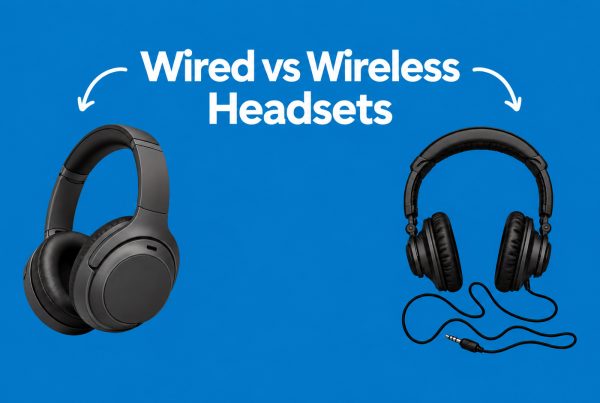
Wired and wireless headsets can both be suitable for offices and call centers. Wired models are often practical for fixed workstations, while wireless headsets provide more freedom of movement. The right option depends on the user’s role, communication system, workspace, and budget.
Wired headsets
Wired headsets connect directly to a computer, desk phone, or another device.
They are particularly useful for employees who remain at their desks throughout the day.
Advantages of wired headsets
- No battery charging
- Simple setup
- Consistent connection
- Often lower cost
- Suitable for fixed workstations
- Easy to deploy across large teams
A model such as the Logitech H390, for example, uses a wired USB connection and includes a noise-cancelling microphone.
Wireless headsets
Wireless headsets connect using technologies such as Bluetooth or a dedicated wireless receiver.
They give employees more freedom to move around while remaining connected.
This can be useful for:
- Managers
- Supervisors
- Hybrid workers
- Remote employees
- Employees who frequently move between workspaces
Advantages of wireless headsets
- Greater mobility
- No cable around the desk
- Useful for hybrid work
- Convenient for switching between devices on supported models
- More freedom during calls
The main consideration is battery management.
A wireless headset that runs out of power during a work shift can become a productivity problem.
Wired vs wireless: quick comparison
Feature | Wired | Wireless |
Battery | Not required | Required |
Mobility | Limited | High |
Setup | Usually simple | May require pairing or receiver |
Charging | Not required | Required |
Cost | Often lower | Often higher |
Best for | Fixed workstations | Mobile and hybrid workers |
Call center use | Excellent for fixed desks | Useful where mobility is needed |
Key Features to Look for in a Noise-Cancelling Headset
The best noise-cancelling headset is not necessarily the most expensive model. IT and procurement teams should focus on the features that directly affect communication, comfort, compatibility, and long-term use.
1. Noise-cancelling microphone
For call centers, microphone performance should be one of the first things you evaluate.
The microphone should capture the employee’s voice clearly while reducing unwanted sounds around them.
2. Active Noise Cancellation
ANC can be valuable in noisy environments because it helps reduce sound reaching the user.
However, remember that ANC and microphone noise cancellation are different technologies.
3. Comfort
Call center agents may wear their headsets for several hours every day.
Look for:
- Comfortable ear cushions
- Adjustable headbands
- Lightweight construction
- Reasonable clamping pressure
- Breathable materials where appropriate
- Replaceable ear cushions
A headset that sounds excellent but becomes uncomfortable after two hours may not be a good choice for an eight-hour workday.
4. Connectivity
Before purchasing a headset, identify what your employees actually use.
Common connection types include:
- USB-A
- USB-C
- Bluetooth
- DECT
- 3.5 mm
- RJ9
- Quick Disconnect
Compatibility should be checked before placing a large order.
5. Battery life
Wireless headsets should have enough battery capacity for the user’s normal workday.
For example, Logitech lists the Zone Wireless 2 at up to 15 hours of talk time with ANC enabled and up to 18 hours with ANC disabled, although actual battery life depends on usage and conditions.
6. Device compatibility
The headset should work with the devices and communication platforms your organization uses.
These may include:
- Microsoft Teams
- Zoom
- Google Meet
- VoIP software
- IP phones
- Computers
- Smartphones
7. Durability
Call center equipment is used frequently.
For large deployments, look beyond the initial price and consider:
- Build quality
- Warranty
- Replacement parts
- Ear cushions
- Cables
- Support
- Expected service life
8. Controls
Easy-to-access controls can improve the user experience.
Useful controls may include:
- Volume
- Mute
- Call answer/end
- ANC
- Bluetooth
- Microphone mute
Best Noise-Cancelling Headsets for Offices and Call Centers
There is no single headset that is best for every office or call center. Different users need different combinations of connectivity, microphone performance, noise reduction, comfort, and mobility.
Logitech H390
The Logitech H390 is a wired USB headset designed for computer-based communication.
Its noise-cancelling microphone makes it relevant for users who participate in online meetings, customer calls, and other computer-based communication.
Best suited for:
- Office employees
- Customer service teams
- Remote workers
- Online meetings
- Fixed workstations
Its wired design also means users do not need to worry about charging a battery.
Logitech Zone Wireless
The Logitech Zone Wireless range is designed for users who need wireless connectivity and business communication features.
A wireless headset can be useful for employees who need to move around while remaining connected to their computer or supported devices.
For more demanding business environments, the Logitech Zone Wireless 2 combines hybrid ANC with multiple noise-cancelling microphones and support for major collaboration platforms.
Best suited for:
- Business executives
- Managers
- Hybrid workers
- Remote workers
- Employees who need mobility
VT Flow
The VT Flow is a wireless ANC headset designed for professional communication.
It combines Bluetooth connectivity with noise cancellation and microphone noise reduction, making it relevant for employees who work in different environments.
Best suited for:
- Hybrid employees
- Remote workers
- Managers
- Business professionals
- Employees who move between workspaces
If you want to understand more about how the technology works, Promallshop’s article on the VT Flow explains how noise cancellation helps users stay focused.
VT 6300
The VT 6300 is a wired headset with dual noise-cancelling microphones.
Its USB connectivity makes it suitable for computer-based communication, particularly where employees remain at fixed workstations.
Best suited for:
- Call center agents
- Customer service teams
- IT support
- Office employees
- Fixed workstations
VT6200UNC-D
The VT6200UNC-D is another professional wired headset available in the Promallshop headset range.
It can be considered when an organization needs a wired communication solution for employees who work primarily from their desks.
Other professional headset brands
Businesses may also consider professional headset brands such as Jabra, Poly, Grandstream and Yealink.
For example, the Jabra Evolve2 65 Flex combines ANC, voice-isolating microphones, wireless connectivity, and compatibility with major collaboration platforms.
The important point is to compare the actual features rather than selecting a headset simply because the brand is familiar.
Quick comparison
Headset | Connection | Noise Reduction | Suitable For |
Logitech H390 | Wired USB | Noise-cancelling mic | Office and computer calls |
Logitech Zone Wireless | Wireless | ANC / mic noise reduction depending on model | Hybrid and mobile workers |
VT Flow | Bluetooth wireless | ANC + microphone noise reduction | Remote and hybrid work |
VT 6300 | Wired USB | Dual noise-cancelling microphones | Call centers and offices |
VT6200UNC-D | Wired | Noise-cancelling features | Fixed workstations |
Product availability and specifications can change, so verify the current product page before making a purchase
How to Choose the Right Headset for Your Team
Choosing headsets for an entire organization requires a structured approach. Start with the working environment, then consider connectivity, communication platforms, comfort, noise levels, and total cost of ownership.
Identify the working environment
Ask how and where employees work.
Is it:
- A quiet private office?
- An open-plan office?
- A busy call center?
- A home office?
- A hybrid workspace?
A headset designed for a quiet private office may not be the right choice for a busy contact center.
Identify the communication system
Determine whether employees use:
- Microsoft Teams
- Zoom
- Google Meet
- VoIP applications
- Desk phones
- Mobile phones
This helps narrow down compatible headsets.
Determine whether employees need mobility
If employees remain at their desks, wired models may be sufficient.
If they frequently move around, wireless headsets may provide greater convenience.
Test microphone quality
This is one of the most important steps.
Do not only test what the employee hears.
Make a test call and ask another person to listen.
Check whether:
- The voice sounds clear
- Background conversations are noticeable
- There is distortion
- The microphone picks up keyboard sounds
- The headset remains clear when the employee moves
Test comfort
If possible, allow employees to test shortlisted headsets before purchasing them in bulk.
Comfort can vary significantly from one person to another.
Calculate total cost of ownership
The purchase price is only part of the cost.
Consider:
- Warranty
- Replacement units
- Accessories
- Ear cushions
- Batteries
- Chargers
- Maintenance
- IT setup
- Employee downtime
A slightly more expensive headset can sometimes make more sense if it reduces replacement and support costs.
Common Mistakes to Avoid When Choosing a Call Center Headset
Several common mistakes can lead to poor headset purchases. The biggest issue is often focusing on one specification while ignoring how employees actually use the equipment.
Assuming ANC means microphone noise cancellation
ANC primarily helps the wearer hear more clearly.
It does not automatically mean the person on the other end will stop hearing background conversations.
Choosing based only on price
The cheapest headset may not provide the comfort, durability or microphone quality required for daily professional use.
At the same time, the most expensive model may offer features your employees do not need.
The goal should be to match the specification to the job.
Ignoring comfort
If employees wear a headset for several hours, comfort becomes an important operational consideration.
Buying wireless without considering charging
Wireless headsets need a charging plan.
For a large call center, procurement teams should think about where and when headsets will be charged.
Ignoring compatibility
A headset may work perfectly on one computer but not provide the expected functionality with a particular phone system or collaboration platform.
Always test compatibility before a large deployment.
Failing to test the microphone
A headset can sound excellent to the user while performing poorly for the person receiving the call.
Always test both sides of the conversation.
Best Practices for Using Headsets in Call Centers
Good headset performance does not depend only on the hardware. How employees use and maintain their equipment also matters.
Keep the microphone positioned correctly
The microphone should be positioned close enough to capture the user’s voice clearly without being directly in the path of breathing.
Keep headsets clean
In shared environments, headsets should not be casually passed between employees without appropriate cleaning.
For individual headsets, users should also keep ear cushions and other contact areas clean.
Train employees
Employees should know how to:
- Mute their microphone
- Adjust volume
- Position the microphone
- Connect the headset
- Charge wireless models
- Report faults
- Switch between devices where supported
Keep replacement units available
In a busy call center, a failed headset can prevent an employee from working effectively.
Keeping spare units available can reduce unnecessary downtime.
Monitor recurring problems
If several employees complain about poor call quality, investigate whether the problem is caused by:
- Headsets
- Computers
- Network connection
- Software
- Microphone settings
- Background noise
This prevents organizations from replacing equipment unnecessarily.
Future Trends in Business and Call Center Headsets
Business headsets are becoming more advanced as hybrid work, artificial intelligence, and unified communications continue to develop. Future headset systems are likely to place greater emphasis on intelligent noise reduction, platform integration, personalization, and improved employee comfort.
AI-powered noise reduction
Modern communication systems are increasingly using AI to distinguish speech from unwanted background sounds.
This can work alongside headset-based noise cancellation.
Adaptive ANC
Some newer headsets can automatically adjust noise cancellation according to the surrounding environment.
Instead of using the same level of cancellation everywhere, the headset can respond to changes in the user’s environment.
Better collaboration-platform integration
Business headsets are increasingly designed around platforms such as Microsoft Teams and Zoom.
Features such as dedicated controls, certification, call notifications, and device management can simplify communication for organizations.
Greater focus on hybrid work
Employees may work from an office one day and from home the next.
As a result, headsets increasingly need to be portable, comfortable, wireless, and compatible with multiple devices.
Smarter microphone technology
Microphones are also becoming more sophisticated.
Instead of simply increasing microphone sensitivity, modern systems can use multiple microphones and software processing to identify the user’s voice and reduce surrounding sounds.
Conclusion
The best noise-cancelling headset for an office or call center depends on the environment, communication system, employee role, and budget.
For fixed workstations, a wired USB headset can provide a simple and reliable solution. For employees who need mobility, wireless models can provide greater flexibility. In noisy call centers, however, microphone noise cancellation should be a major consideration because it affects how clearly customers hear agents.
Before making a purchase, consider the headset’s microphone, ANC capabilities, comfort, connectivity, compatibility, battery life, durability, and total cost of ownership.
Most importantly, test the headset in the environment where employees will actually use it. A model that performs well in a quiet showroom may behave differently on a busy call-center floor.
For businesses in Nigeria, Ghana, and Ivory Coast, choosing professional headsets that match the working environment can help create a more consistent communication experience across office and remote teams.
FAQs
Noise-cancelling headsets reduce unwanted environmental sound using technologies such as passive isolation, ANC, microphone noise cancellation, or a combination of these technologies.
The best option depends on the call center's equipment and working environment. Look for a professional headset with a strong noise-cancelling microphone, comfortable construction, and compatible connectivity.
Item content. Click the edit button to change this text.
ANC reduces environmental sound that reaches the headset wearer. A noise-cancelling microphone reduces unwanted sounds picked up while the user speaks.
Yes. Wireless headsets can be useful where employees need mobility. However, businesses should consider battery life, charging, wireless reliability, compatibility, and cost before purchasing them in large quantities.