Table of Contents
ToggleIntroduction
A good monitor does more than display images. It can change how you play games, manage projects, edit videos and organise your daily workload. However, when a standard monitor starts feeling restrictive, a super ultrawide display can offer a different way to work and play.
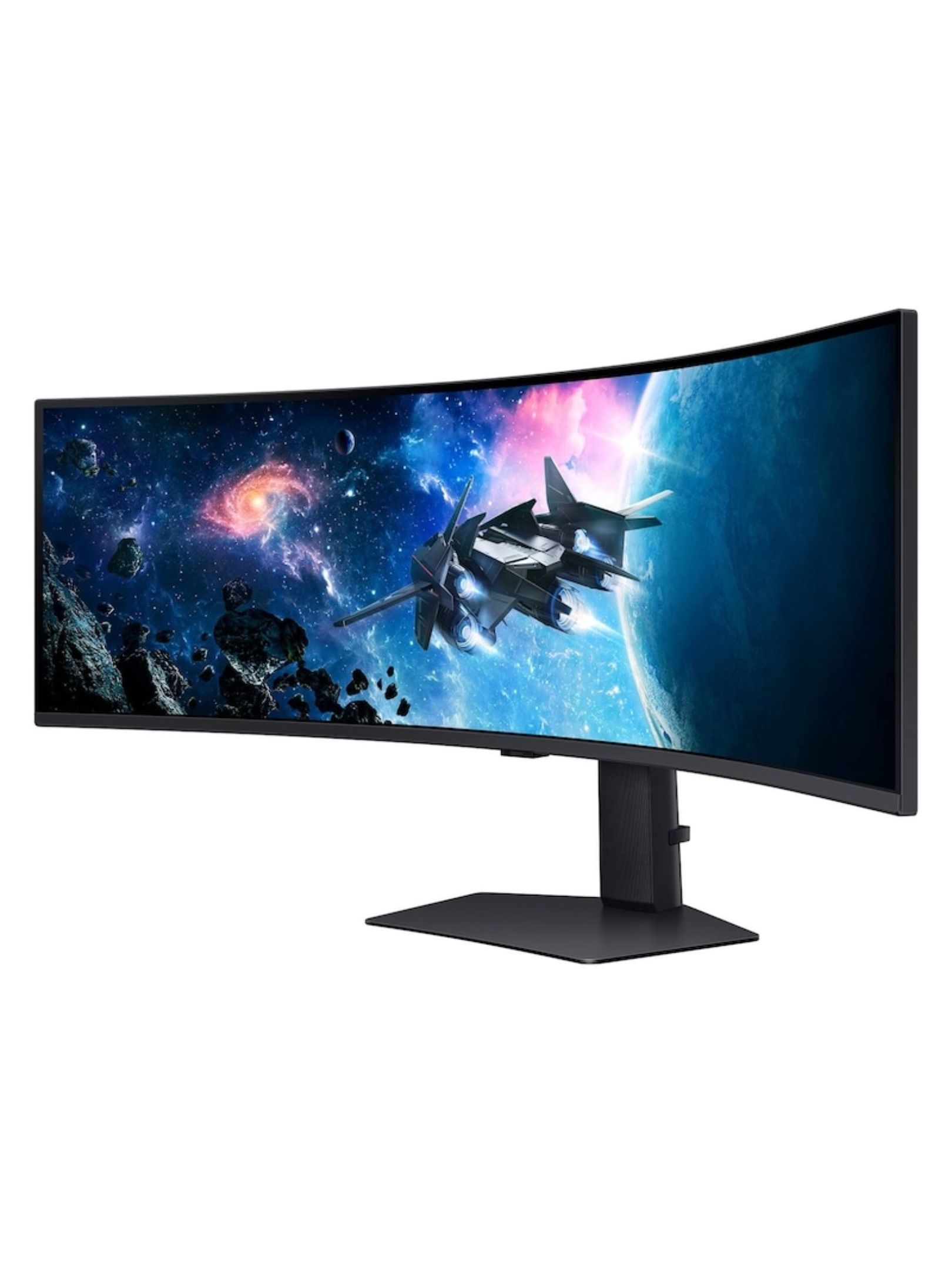
The Samsung Odyssey G9 49-Inch Ultrawide Monitor combines a sweeping curved screen, high refresh rate and expansive desktop workspace. As a result, it appeals to professional gamers, streamers, developers, content creators and financial traders who want more room without placing several separate monitors on their desks.
If you are considering this monitor in Nigeria, this guide covers its price, specifications, strengths, limitations and suitability for different users.
What is the Samsung Odyssey G9? It is a 49-inch super ultrawide curved monitor designed for immersive PC gaming and multitasking. Its 32:9 aspect ratio and Dual QHD resolution provide the horizontal workspace of two 27-inch QHD screens placed side by side, without the central bezel between them.
Table of Contents
- Introduction
- Samsung Odyssey G9 price in Nigeria
- Specifications and key features
- Gaming performance and display quality
- Productivity and professional applications
- Advantages and disadvantages
- Odyssey G9 versus two monitors and OLED alternatives
- Who should buy the Odyssey G9?
- Buying guide and setup tips
- Conclusion
- FAQs
Samsung Odyssey G9 Price in Nigeria
The Samsung Odyssey G9 49-inch monitor is listed on Promallshop for ₦2,100,000, reduced from a displayed price of ₦2,625,000. However, monitor prices and promotional offers can change, so confirm the current price, stock status and exact model before placing an order.
How much does the Samsung Odyssey G9 cost?
The listed price is ₦2,100,000 for the S49CG954EU model on Promallshop. This is a retailer-listed price rather than a guarantee of current availability. Buyers in Nigeria should also confirm delivery charges, warranty terms and payment conditions.
You can buy the Samsung Odyssey G9 49-inch monitor on Promallshop.
What should buyers in Nigeria, Ghana and Côte d’Ivoire know?
For buyers outside Nigeria, the final cost may differ because of currency conversion, shipping, import charges and local taxes. Therefore, customers in Ghana and Côte d’Ivoire should request a market-specific quotation rather than assume the Nigerian price applies in their country.
Before purchasing, confirm:
- The exact model number and included accessories.
- Current stock and delivery timelines.
- Warranty coverage and the process for reporting faults.
- The total delivered cost, including any applicable fees.
- Whether the advertised discount is still available.
Samsung Odyssey G9 Specifications and Key Features
The Odyssey G9’s main attraction is the combination of an extremely wide screen and high refresh rate. The listed S49CG954EU configuration features a 49-inch VA panel, 5,120 × 1,440 resolution, 1000R curvature and 240Hz refresh rate. Buyers should verify the specifications against the precise model and regional variant they intend to purchase.
Quick facts
Feature | Listed specification |
Brand | Samsung |
Model | S49CG954EU |
Screen size | 49 inches |
Panel type | VA |
Resolution | 5,120 × 1,440 pixels, Dual QHD |
Aspect ratio | 32:9 |
Curvature | 1000R |
Refresh rate | Up to 240Hz |
Response time | 1ms, as advertised |
HDR | Quantum HDR2000, as listed |
Adaptive sync | G-SYNC compatibility and FreeSync Premium Pro, as listed |
Main uses | Gaming, multitasking and productivity |
Source: Promallshop’s product listing and Samsung’s official specifications for the relevant G9 family. Verify regional model differences before ordering.
What does Dual QHD resolution mean?
Dual QHD means a resolution of 5,120 × 1,440 pixels. In practical terms, the screen combines the horizontal pixel count of two 2,560 × 1,440 QHD displays while maintaining a 1,440-pixel vertical resolution.
Consequently, you can place a video-editing timeline beside a preview window, keep code and documentation open together, or monitor several trading charts at once. You gain a wide workspace without the physical gap created by two separate monitors.
Why does the 1000R curve matter?
The 1000R curvature means the screen follows a relatively tight curve with a nominal radius of 1,000 millimetres. This design helps bring the outer edges of the display into your field of view, which is especially useful on a screen this wide.
Nevertheless, comfort depends on viewing distance, desk depth and personal preference. Position the screen so that you can see its edges without repeatedly turning your head.
Gaming Performance and Display Quality
The Samsung Odyssey G9 is built for players who want both immersion and responsive gameplay. Its 240Hz refresh rate can display up to 240 frames per second when the computer supplies them, while its curved Dual QHD screen expands the visible gaming environment. Actual performance depends on the graphics card, game and settings.
Is the Samsung Odyssey G9 good for gaming?
Yes, particularly for PC gamers who play compatible titles and have powerful enough hardware. The 32:9 display creates a broad field of view, while the high refresh rate supports smooth motion in fast-paced games.
For example, a racing game can feel more immersive when the cockpit and surrounding environment extend across the screen. Likewise, supported simulation and strategy games can benefit from the additional horizontal space.
However, not every game supports ultrawide resolutions properly. Some titles may show black bars, crop parts of the interface or stretch elements. Check compatibility with your favourite games before buying.
What do 240Hz and 1ms mean?
The 240Hz refresh rate describes how often the display can refresh its image each second. Compared with a 60Hz display, it can show substantially more updates, provided your computer delivers enough frames.
The advertised 1ms response time refers to pixel transitions measured under specified conditions. It does not mean every aspect of system latency is one millisecond, nor does it guarantee that all motion will be completely free of blur.
Together, a high refresh rate and fast pixel response can help make gameplay feel more responsive. Still, your graphics card, game engine and input devices also affect the final experience.
What about HDR and adaptive sync?
The listing advertises Quantum HDR2000 alongside AMD FreeSync Premium Pro and NVIDIA G-SYNC compatibility. HDR can improve the range of visible highlights, shadows and colours when the display, operating system and content work together appropriately.
Adaptive sync helps coordinate the display’s refresh rate with the graphics card’s output. This can reduce visible tearing and stuttering during gameplay.
For the best result, use a compatible connection, install current graphics drivers and enable the appropriate display settings. Also, distinguish between advertised HDR branding and independently verified display performance: peak brightness, contrast and local dimming behaviour matter when assessing real HDR quality.
Productivity and Professional Applications
A super ultrawide monitor can be as useful for work as it is for gaming. By keeping several windows visible simultaneously, the Odyssey G9 can reduce the need to switch repeatedly between applications. Its value depends on whether your everyday tasks genuinely benefit from a wide, continuous workspace.
Video editing and content creation
Video editors can place a long timeline beside preview footage, editing controls and media libraries. This is particularly helpful when working on complex projects with multiple tracks.
Streamers can keep their broadcasting software, chat, recording controls and monitoring tools visible while playing a game. Graphic designers may also appreciate the room for design software, reference images and asset panels.
However, a wide screen is not automatically the best screen for every creative task. Colour-critical work still requires attention to calibration, colour-space coverage and consistency. Check the exact panel’s measured performance before relying on it for professional colour grading.
Software development and programming
Developers often work across an editor, terminal, browser, documentation and testing tools. The Odyssey G9 lets you arrange these applications side by side without constantly minimising windows.
For example, a developer could dedicate one section to code, another to a running application and a third to documentation. This can make debugging and comparing information easier.
Nevertheless, the wide format does not replace a good workflow. You will still need sensible window layouts, readable text scaling and enough desk depth to maintain a comfortable viewing position.
Financial trading and data analysis
Financial traders and analysts frequently compare dashboards, charts, spreadsheets and market information. The G9’s expansive desktop can accommodate several information panels at once, which may make monitoring easier.
However, a wider monitor does not guarantee better investment decisions or faster trades. Users should also consider the reliability of their trading platform, network connection and data sources. If uninterrupted monitoring is essential, consider whether a separate backup display would be useful.
Office work and multitasking
For professionals who frequently move between spreadsheets, meetings, reports and communication tools, the G9 offers a broad working canvas. Picture-by-Picture mode can also be useful when connecting two compatible computers and displaying their outputs simultaneously.
Before purchasing, check which input combinations and resolutions the exact model supports. You should also consider whether your workplace applications scale properly across an ultrawide desktop.
Advantages and Disadvantages
The Odyssey G9 combines a large workspace with gaming-focused performance, but it also makes significant demands on your desk, computer and budget. Understanding these trade-offs will help you decide whether its features justify the investment.
Advantages
- Expansive workspace: Dual QHD resolution provides room for several applications.
- Immersive gaming: The 32:9 aspect ratio and curved screen can enhance compatible games.
- High refresh rate: Up to 240Hz supports smooth, responsive gameplay.
- Reduced bezel interruption: One continuous display avoids the central border of a dual-monitor setup.
- Flexible multitasking: Picture-by-Picture and Picture-in-Picture features are useful on supported configurations.
- Versatile applications: Gaming, coding, streaming, analytics and general productivity can all benefit.
Disadvantages
- High purchase cost: The listed price is a substantial investment.
- Large desk footprint: The screen and stand need considerable space.
- Demanding graphics requirements: Running modern games at native Dual QHD resolution and high frame rates requires capable hardware.
- Variable game compatibility: Not all games handle 32:9 displays equally well.
- Potential creative-work limitations: Professional colour accuracy should be verified rather than assumed.
- No universal replacement for multiple monitors: Separate displays can be more practical for independent workspaces or redundancy.
Overall, the G9 is most attractive when the user will take advantage of its width and high refresh rate regularly. For basic office work, a less expensive monitor may deliver better value.
Odyssey G9 vs Two Monitors and OLED Alternatives
The right choice depends on whether you value a continuous workspace, deep contrast, cost savings or flexibility. Although the Odyssey G9 can replace two QHD monitors in some setups, it does not automatically outperform every dual-screen arrangement or every OLED alternative.
Samsung Odyssey G9 vs two 27-inch QHD monitors
Consideration | Odyssey G9 | Two separate QHD monitors |
Workspace | Continuous ultrawide canvas | Two independent screens |
Resolution | 5,120 × 1,440 | 5,120 × 1,440 combined |
Central bezel | None | Bezel between screens |
Window arrangement | Flexible, with software layouts | Natural separation between displays |
Redundancy | One screen | One screen can remain usable if the other fails |
Desk setup | Wide monitor and large stand | Two stands or a dual-monitor arm |
Purchase cost | Higher initial investment in many setups | Varies by model and specification |
The G9 is appealing if you dislike the central bezel or want one continuous gaming display. On the other hand, two separate monitors may be better if you prefer independent orientation, easier repositioning or separate screens for different devices.
Samsung Odyssey G9 vs OLED G9
Samsung’s Odyssey G9 name covers multiple configurations, including VA-based and OLED models. These should not be treated as identical products.
OLED G9 variants use OLED technology and may offer deeper blacks, different curvature, different response-time specifications and different HDR characteristics. For example, Samsung lists a 49-inch Odyssey OLED G9 model with 1800R curvature, 240Hz refresh rate and a stated 0.03ms grey-to-grey response time.
The VA-based S49CG954EU listing discussed in this guide instead specifies a 1000R curve and 1ms response time. Therefore, compare the exact model numbers, panel technology, connectivity, warranty and price before deciding which is better for you.
Who Should Buy the Samsung Odyssey G9?
The Odyssey G9 makes the most sense for users whose work or entertainment benefits from a wide screen and high refresh rate. It is less compelling for people who mainly browse websites, write documents or use applications that do not need a large desktop.
Best suited to
- Professional gamers: Especially those playing compatible PC titles that benefit from ultrawide visuals and high refresh rates.
- Streamers: Users who need space for gameplay, chat and broadcasting controls.
- Video editors and content creators: Professionals managing long timelines, preview windows and multiple editing panels.
- Software developers: People working across code editors, terminals, browsers and documentation.
- Financial traders and analysts: Users comparing multiple charts, spreadsheets and dashboards.
- Multitasking professionals: Anyone who frequently works across several applications simultaneously.
Who should consider another monitor?
A standard 27-inch or 32-inch display may be more practical for someone with limited desk space, a modest graphics card or a tight budget. Likewise, a colour-critical creative professional should compare independent colour-accuracy measurements before choosing the G9 over a specialised reference display.
The best monitor is not necessarily the largest. It is the one that fits your workflow, hardware, workspace and budget.
Buying Guide and Setup Tips
Before ordering a premium ultrawide monitor, verify the model, compatibility and ownership costs. A careful check can prevent issues involving insufficient desk space, incompatible connections or unrealistic expectations about gaming performance.
Confirm the exact model
Check the full model number on the retailer’s listing and confirm that the advertised specifications match it. Samsung sells different Odyssey G9 variants, so avoid assuming that all models share the same panel, curvature, refresh rate or HDR features.
Check your computer
At 5,120 × 1,440 resolution, the monitor must process approximately 7.37 million pixels per frame. Driving games at high settings and high refresh rates can therefore demand considerable graphics performance.
Check your graphics card’s supported resolution, refresh rate and output standards. You should also verify the cable and connection requirements for your intended configuration.
Measure your desk
Samsung’s official specifications for the G95C-family design list a width of approximately 1,148mm with its stand, although dimensions vary between models. Measure the available desk width and depth, and leave room for your keyboard, mouse and other equipment.
Also check the monitor’s weight, stand footprint and mounting requirements if you plan to use a monitor arm.
Check connectivity
Confirm the available HDMI, DisplayPort and USB connections on the exact model. If you intend to connect a gaming PC and a work computer simultaneously, check the supported Picture-by-Picture combinations and the resolution or refresh-rate limitations of each input.
Confirm warranty and delivery
Ask the retailer to clarify the warranty provider, coverage period, return policy and process for handling transit damage or faults. For buyers outside Nigeria, request a delivered quotation that includes applicable shipping and import costs.
Configure the monitor properly
Once installed, select the appropriate native resolution and supported refresh rate in your operating system. Update your graphics drivers, enable compatible adaptive-sync settings where appropriate and arrange your windows for comfortable viewing.
For long work sessions, adjust brightness to the room, use sensible text scaling and position the screen at a comfortable distance. These small changes can make a substantial difference to everyday usability.
Conclusion
The Samsung Odyssey G9 49-Inch Ultrawide Monitor is a premium option for users who want immersive PC gaming and a large, continuous workspace. Its advertised Dual QHD resolution, 1000R curvature and 240Hz refresh rate make it especially appealing to gamers, streamers, developers and professionals who manage several applications at once.
However, its high cost, large footprint and demanding graphics requirements mean it is not the right choice for everyone. Before buying, confirm the exact model, current Nigerian price, warranty and computer compatibility. If its strengths match your workflow, the Odyssey G9 can become a capable centrepiece for both gaming and productivity.
FAQs
Promallshop lists the Samsung Odyssey G9 S49CG954EU at ₦2,100,000, with a displayed former price of ₦2,625,000. However, prices and stock can change, so confirm the current offer with the retailer before ordering.
The monitor offers Dual QHD resolution of 5,120 × 1,440 pixels. This provides a wide desktop workspace comparable to two QHD monitors arranged side by side.
Yes. Its advertised 240Hz refresh rate, 1ms response time and curved ultrawide display make it suitable for compatible PC games. However, the experience depends on your graphics card, game compatibility and settings.
Yes, for many workflows. Its 32:9 aspect ratio provides room for several applications without a central bezel. Nevertheless, two separate monitors may offer more flexibility when you need independent orientations or a backup display.
It can be useful for video editing because its wide screen accommodates timelines, preview windows and editing panels simultaneously. For colour-critical work, however, check the exact model's colour accuracy, calibration options and colour-space coverage.