Choosing between a 4K webcam and a Full HD webcam can seem like a simple question of “higher resolution equals better quality.” In practice, the answer is more complicated. Your conferencing platform, internet connection, computer, lighting, monitor and intended use can all affect how much you actually benefit from 4K.
For an individual working from home, a 1080p webcam may provide everything needed for professional meetings. For a corporate team, BPO or call centre, the decision also involves deployment cost, bandwidth, compatibility and scalability.
So, which should you choose?
In most cases, Full HD is the smarter choice for ordinary business video calls, while 4K is worth considering when image detail and flexibility are important.
Table of Contents
ToggleTable of Contents
- Introduction
- What Is a 4K Webcam?
- What Is a Full HD Webcam?
- 4K vs Full HD Webcam: Key Differences
- Is a 4K Webcam Actually Better?
- When Should You Choose a 4K Webcam?
- When Is Full HD the Better Choice?
- What BPOs and Call Centres Should Consider
- Other Webcam Features That Matter
- Common Webcam Buying Mistakes
- Best Practices for Business Video Calls
- Future of Business Webcams
- Conclusion
What Is a 4K Webcam?
A 4K webcam captures video at up to approximately 3840 × 2160 pixels for standard UHD, providing about four times the pixel count of 1920 × 1080 Full HD. That extra detail can be valuable for recording, cropping, presentations and professional video production, but conferencing software may not transmit the full 4K image.
The important word here is resolution.
A 4K image contains substantially more pixels than a 1080p image. That gives the camera more information to work with when capturing fine details.
For example, a good 4K webcam may make it easier to see:
- Facial details
- Text on a whiteboard
- Product details
- Small objects
- Fine textures
- Presentation materials
However, buying a 4K webcam does not guarantee that everyone in a video meeting will see you in 4K.
That distinction is important.
What Is a Full HD Webcam?
A Full HD webcam records video at 1920 × 1080 pixels, commonly called 1080p. It provides a sharp image for most business meetings while generally requiring less processing and data than higher-resolution video. For everyday Teams, Zoom and Google Meet calls, Full HD is often a practical balance between quality and cost.
Full HD has become a common standard for professional webcams because it provides enough detail for a typical head-and-shoulders video call.
Microsoft itself recommends 720p or 1080p webcams for presenting in Teams meetings.
Google Meet similarly lists a 1080p camera among the optimal hardware requirements for Full HD camera video and high-quality visual effects.
In other words, you do not necessarily need 4K simply because you want to look professional on a video call.
4K vs Full HD Webcam: Key Differences
The biggest difference is resolution, but resolution is only one part of webcam performance. A 4K webcam can capture significantly more detail, while a good Full HD webcam can still deliver excellent business video. Factors such as lighting, sensor quality, autofocus, frame rate, field of view and conferencing-platform limits can matter just as much.
| Feature | 4K Webcam | Full HD Webcam |
|---|---|---|
| Resolution | Up to 3840 × 2160 | 1920 × 1080 |
| Image detail | Excellent | Very good |
| Bandwidth requirements | Generally higher | Generally lower |
| Processing requirements | Generally higher | Generally lower |
| Business meetings | Excellent | Excellent |
| Recording | Excellent | Very good |
| Digital cropping | Better | More limited |
| Cost | Usually higher | Usually lower |
| BPO deployment | Useful in selected cases | Usually more practical |
| Future-proofing | Strong | Good |
| Everyday remote work | More than necessary for many users | Usually sufficient |
4K vs 1080p: How Much More Resolution?
A 3840 × 2160 image contains about 8.3 million pixels.
A 1920 × 1080 image contains about 2.1 million pixels.
That means 4K provides roughly four times the number of pixels.
But more pixels do not automatically mean four times better-looking video.
Think of it like buying a much larger canvas. The larger canvas allows you to capture more detail, but the quality of the final painting still depends on the artist, lighting and materials.
The same principle applies to webcams.
Is a 4K Webcam Actually Better?
Yes, a 4K webcam can produce a technically superior image, but the difference is most noticeable when the application, display, lighting and network can take advantage of it. For ordinary video meetings, a high-quality 1080p webcam can look nearly as effective while costing less and placing fewer demands on your setup.
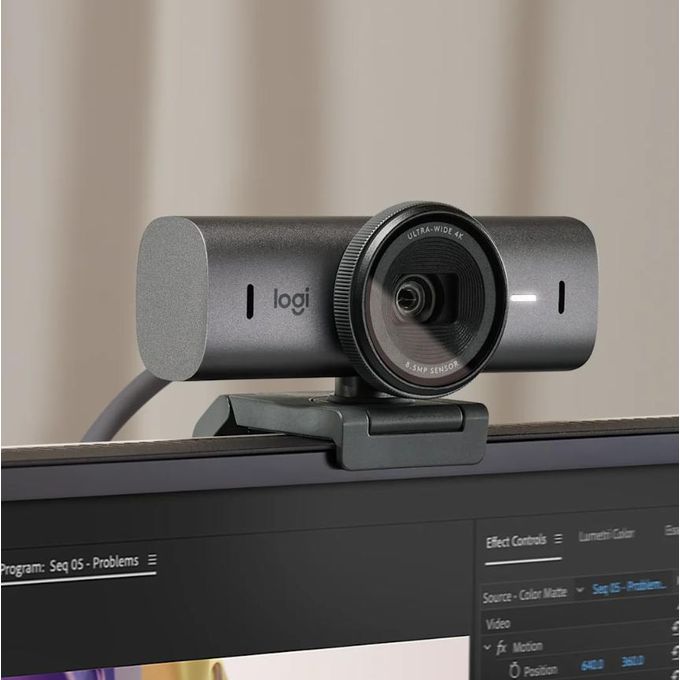
A useful example is the Logitech BRIO 4K.
The camera supports 4K at 30 fps, 1080p at up to 60 fps and 720p at up to 90 fps. It also includes autofocus, adjustable field of view, digital zoom and automatic light correction.
This illustrates an important point:
A good 4K webcam does more than simply increase resolution.
The additional hardware and processing capabilities can make it a more versatile professional camera.
The platform can limit the advantage
One of the biggest misconceptions about buying a 4K webcam is assuming that a 4K camera automatically means a 4K video call.
It does not.
For example, Google Meet’s current maximum send resolution for supported users is 1080p, not 4K.
Microsoft Teams’ meeting-quality documentation likewise reports sent video width/height up to 1920 × 1080 in its typical meeting metrics.
Therefore, a 4K webcam may capture 4K locally while the conferencing service sends a lower-resolution stream.
That does not make the camera useless. It simply means you should understand what you’re actually paying for.
When Should You Choose a 4K Webcam?
Choose a 4K webcam when image detail, cropping flexibility, professional recording or high-quality production matters more than minimizing cost and bandwidth. It is particularly useful for executives, trainers, content creators, product demonstrations and teams that want a premium camera for multiple use cases.
A 4K webcam makes more sense when you:
1. Record training videos
If your company creates employee training material, product demonstrations or educational videos, additional resolution can be useful.
You can also crop the footage without losing as much detail as you would with 1080p footage.
2. Present products or physical documents
Businesses sometimes need to show equipment, documents, prototypes or products during virtual meetings.
Extra resolution can help preserve small details.
3. Create marketing content
If the webcam will also be used for YouTube videos, webinars, tutorials or social media content, 4K provides greater flexibility.
4. Need digital zoom
A high-resolution source gives you more room to crop digitally while maintaining usable image quality.
The Logitech BRIO, for example, supports up to 5× digital zoom.
5. Want a more future-ready setup
If the webcam is expected to remain in service for several years, purchasing a higher-specification camera can provide additional flexibility as software and workflows evolve.
When Is Full HD the Better Choice?
Full HD is usually the better choice when the webcam’s primary purpose is everyday video conferencing. For remote workers, BPO agents, call centre staff and large corporate deployments, 1080p offers a strong balance of image quality, compatibility, bandwidth efficiency and cost.
This is particularly important when buying hundreds of devices.
Imagine a company with 300 employees.
If every employee receives a 4K webcam but the primary conferencing platforms deliver meetings at 1080p or lower, much of that additional camera capability may never be visible to meeting participants.
A procurement manager should therefore ask:
“What quality will our employees actually use?”
rather than:
“What is the highest resolution available?”
That small change in thinking can prevent unnecessary spending.
What BPOs and Call Centres Should Consider
For BPOs and call centres, webcam resolution should be selected according to the actual workflow rather than marketing specifications. If agents mainly handle video-enabled customer calls or internal meetings, Full HD is usually sufficient. Budget should also be considered for headsets, microphones, lighting, connectivity and device management.
This is where the webcam conversation connects with your broader communications setup.
For call centre operations, audio quality is often more important than moving from 1080p to 4K.
A customer may forgive a slightly less detailed video image. They are much less likely to appreciate an agent whose voice is difficult to understand because of background noise.
Google Meet’s troubleshooting guidance specifically recommends using a headset with a microphone when audio quality is poor and highlights network performance as a major factor in video quality.
For BPOs and contact centres, procurement teams should therefore evaluate:
- Webcam resolution
- Microphone quality
- Noise cancellation
- Wired versus wireless connectivity
- Comfort for long shifts
- USB compatibility
- Warranty and support
- Device management
- Lighting
- Internet reliability
- Total cost per employee
A high-quality webcam paired with a poor microphone is not a complete professional communication solution.
For organisations comparing complete communications equipment, you can also explore Call Center Headsets suitable for professional voice communication.
4K Webcam vs Full HD: What Other Features Matter?
Resolution should not be the only specification you compare. Sensor quality, autofocus, field of view, low-light performance, frame rate, microphones, connectivity and software support can have a greater practical effect on video calls than the jump from 1080p to 4K.
Image sensor
The sensor is responsible for converting light into the image captured by the camera.
A well-designed sensor can produce a better image in difficult lighting than a poorly designed high-resolution sensor.
Low-light performance
This is especially important in offices and home workspaces.
A 4K camera in poor lighting can look worse than a good 1080p camera in a well-lit room.
Autofocus
Autofocus helps keep the subject sharp when they move closer or farther away from the camera.
For example, Logitech’s BRIO 4K includes autofocus and automatic light correction.
Field of view
A wider field of view can be useful when several people need to appear in the frame.
For a single employee, however, an extremely wide camera can show too much of the surrounding room.
A narrower view may create a cleaner professional appearance.
Frame rate
Frame rate determines how many frames are captured each second.
A 4K webcam that records at 30 fps may not necessarily look smoother than a 1080p webcam capable of 60 fps.
This is another reason not to judge webcams on resolution alone.
What About Internet Bandwidth?
Higher-resolution video generally requires more data when it is actually transmitted at that resolution, although video compression and conferencing-platform settings affect the final bandwidth requirement. If your organisation has limited or inconsistent connectivity, 1080p may be a more practical target than maximizing camera resolution.
Google Meet explicitly notes that 1080p uses more data than 720p and allows users to reduce video quality when experiencing delays, poor network connections or limited data.
This matters in distributed organisations.
A company with employees working from different locations should not design its hardware requirements around ideal internet conditions.
Instead, consider the real environment:
Camera → computer → network → conferencing platform → recipient
Every stage affects the final experience.
Common Webcam Buying Mistakes
The most common webcam purchasing mistake is choosing based on resolution alone. Buyers often overlook lighting, microphones, autofocus, field of view, platform limitations and network conditions. For organisations, another major mistake is buying premium specifications for every employee when only a small group actually needs them.
Mistake 1: Assuming 4K always looks better
Resolution is important, but it is not everything.
Mistake 2: Ignoring lighting
Even an expensive camera needs suitable lighting.
Microsoft recommends positioning the webcam at eye level and ensuring the face is lit from the front rather than strongly backlit.
Mistake 3: Forgetting the microphone
For customer service, sales and BPO operations, audio quality can be critical.
Mistake 4: Buying based on the maximum specification
A webcam may support 4K without your chosen platform actually transmitting 4K meetings.
Mistake 5: Ignoring compatibility
Before bulk purchasing, IT teams should test the webcam with the organisation’s actual applications, operating systems and security policies.
Best Practices for Business Video Calls
A professional video-call setup does not require the most expensive webcam. The best results come from combining an appropriate camera with good lighting, correct positioning, reliable connectivity and clear audio. Businesses should test the complete setup before standardising equipment across a workforce.
Use these practices:
- Position the camera at eye level.
- Place a light in front of you rather than directly behind you.
- Keep the camera lens clean.
- Use a professional background.
- Test the webcam with your conferencing platform.
- Use a suitable headset when audio clarity is important.
- Check network performance before large-scale deployment.
- Standardise webcam models where possible.
- Keep firmware and conferencing applications updated.
- Test representative user environments before bulk procurement.
4K vs Full HD: Which Is Best for Different Users?
There is no universal winner between 4K and Full HD. The best choice depends on the user’s job. A content creator or trainer may benefit significantly from 4K, while a call centre agent conducting standard video calls can usually work effectively with Full HD.
| User | Recommended |
|---|---|
| Remote office worker | Full HD |
| Call centre agent | Full HD |
| BPO agent | Full HD |
| IT manager | Full HD or 4K |
| Procurement team | Depends on deployment |
| Executive | 4K if premium video is important |
| Trainer | 4K |
| Content creator | 4K |
| Product demonstrator | 4K |
| Webinar host | 4K |
| Everyday Teams user | Full HD |
| Google Meet user | Full HD |
4K vs Full HD Webcam: Pros and Cons
4K Webcam
Pros
- Much higher image detail
- Better flexibility for cropping
- Excellent for recording
- Useful for presentations and demonstrations
- Strong option for professional content
- More future-ready
Cons
- Usually more expensive
- Can require more processing
- Can require more bandwidth when transmitting at higher resolution
- Conferencing platforms may not transmit 4K
- May provide little practical benefit for ordinary meetings
Full HD Webcam
Pros
- Excellent for everyday meetings
- Lower cost
- Generally easier to deploy
- Lower data requirements than higher-resolution video
- Widely supported
- Excellent fit for large-scale business deployments
Cons
- Less detail than 4K
- Less flexibility for heavy digital cropping
- Not ideal if you also want high-resolution content production
What About Headsets for Video Meetings?
A webcam only handles one part of the communication experience. For BPOs, call centres and remote employees, a professional headset with a good microphone can be just as important as camera quality because clear speech directly affects customer conversations, meetings and collaboration.
This is particularly relevant when evaluating a complete workstation.
A professional setup might include:
Webcam + headset + monitor + laptop/desktop + reliable internet + suitable lighting.
For organisations that need better voice isolation, options such as a call center headset with mic noise cancelling, call center wireless headset with mic, or other call center headsets wireless configurations may be more valuable than spending the entire peripheral budget on 4K cameras.
You can also read more about how noise cancellation works in “Noise Cancelling Explained: How the VT Flow Keeps You Focused”.
For buyers comparing specific models, “Top VT Headsets for 2025: Features, Reviews and Pricing Breakdown” can provide additional context.
How Much Should You Spend on a Webcam?
There is no single webcam price that fits every business because cost depends on resolution, sensor quality, microphones, autofocus, field of view, software features, warranty and deployment volume. Procurement teams should compare total value and expected usage rather than choosing the cheapest or highest-resolution model.
For individual users, the sensible approach is to identify the actual requirement first.
For businesses, consider total cost of ownership:
- Purchase price
- Number of employees
- Replacement rate
- Warranty
- IT support
- Compatibility
- Accessories
- Shipping
- Deployment time
- Employee productivity
For example, if a 1080p webcam meets the requirements of 90% of employees while 4K is only needed by trainers and executives, a mixed deployment can make more financial sense than purchasing 4K cameras for everyone.
Future Trends in Business Webcams
Business webcams are moving beyond resolution alone, with features such as automatic framing, improved low-light processing, HDR, AI-powered image enhancement, advanced microphones and software-based camera controls becoming increasingly important. As a result, buyers should evaluate the complete imaging system rather than treating pixel count as the primary measure of quality.
The direction is already visible in current business webcams.
For example, Logitech’s business webcam range includes features such as automatic light correction, adjustable framing and AI-powered image enhancement on some models.
This suggests an important shift in purchasing decisions:
The question is gradually becoming less “How many pixels does it have?” and more “How intelligently does it produce a usable image?”
That is particularly important for corporate environments where lighting and user behaviour vary widely.
Conclusion
4K webcams provide four times as many pixels as 1080p Full HD webcams, but that does not automatically make them better for every video call. For most business meetings, 1080p is sufficient because conferencing platforms, bandwidth, lighting and display resolution can limit the benefit of 4K.
Choose a 4K webcam if you need maximum image detail, frequent recording, content creation, digital cropping, demonstrations or future-proofing.
Choose a Full HD webcam if your main use is Teams, Zoom, Google Meet, remote work or everyday business meetings where value, bandwidth and simplicity matter more.
The debate between a 4K webcam and a Full HD webcam is not really about which technology is universally better. It is about choosing the right tool for the job.
If you mainly attend Microsoft Teams, Zoom or Google Meet meetings, a good 1080p webcam is likely to provide everything you need. For large BPOs and call centres, Full HD can also make sense because procurement teams must balance quality with deployment cost, network requirements and scalability.
On the other hand, 4K becomes much more attractive when the webcam will also be used for recording, training, presentations, product demonstrations, content creation or applications where additional image detail and cropping flexibility matter.
The best webcam is therefore not necessarily the one with the highest resolution. It is the one that delivers the right quality for your workflow without paying for capabilities you will not use.
FAQs
Yes, in terms of maximum image resolution and detail. However, a 4K webcam is not necessarily better value for ordinary video meetings because many conferencing platforms do not transmit meetings in 4K.
Yes. 1080p is generally sufficient for professional video conferencing. Microsoft recommends 720p or 1080p webcams for Teams, while Google Meet supports 1080p under eligible conditions.
Usually, no. If your primary purpose is Teams meetings, a good Full HD webcam is often sufficient. Teams' meeting-quality documentation lists sent video dimensions up to 1920 × 1080.
It can. Higher-resolution video generally requires more data when transmitted at that resolution. However, compression and platform settings affect actual bandwidth usage.
For normal meetings, often not. A good 1080p webcam is usually enough. However, 4K can be worthwhile if you also record videos, create content or frequently need to crop footage.