Table of Contents
ToggleIntroduction
Choosing televisions for a hotel or business involves more than finding a screen at the right price. You also need to consider viewing distance, ease of configuration, maintenance, entertainment options and the experience you want customers or guests to have.
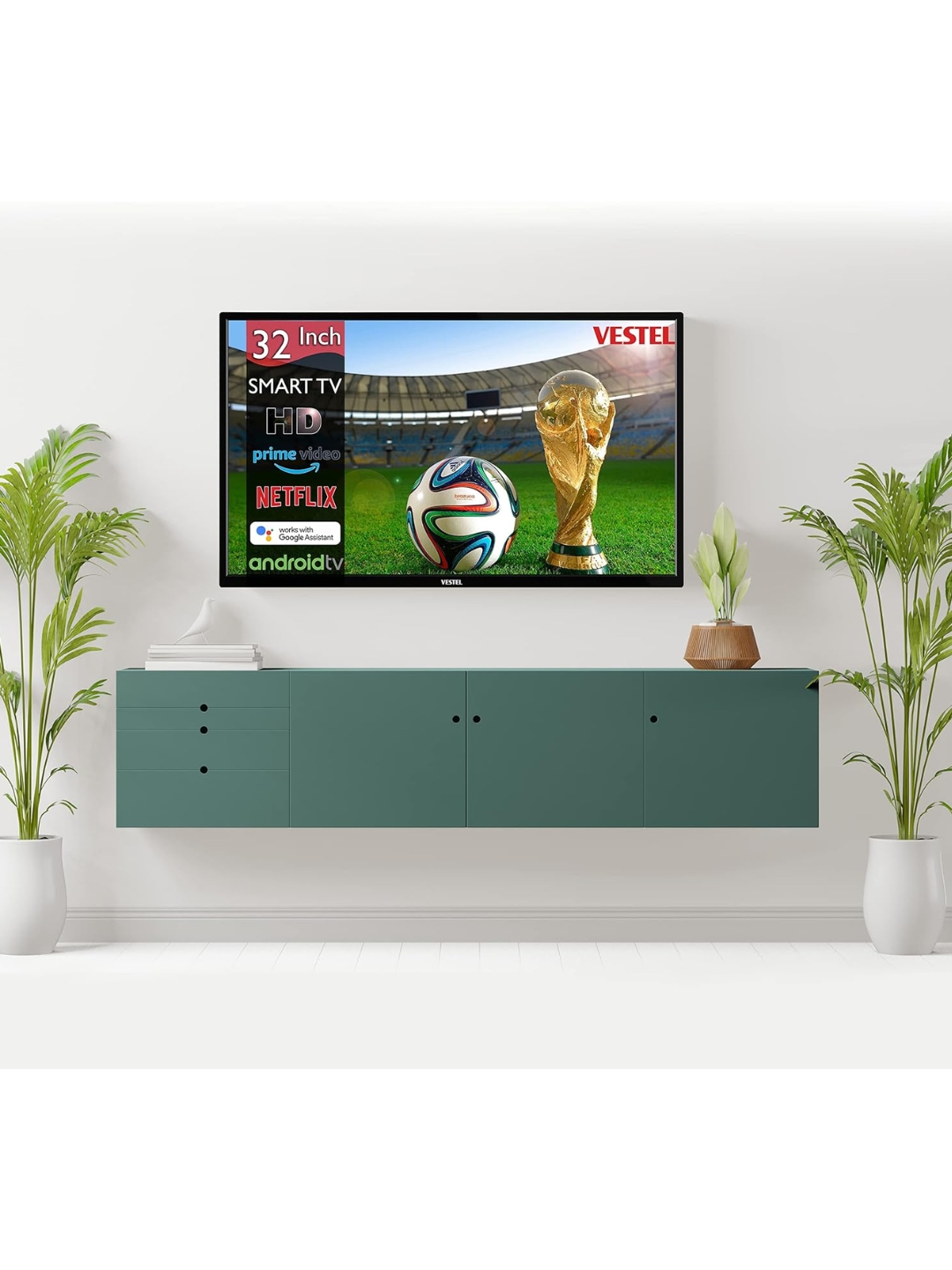
For hotels, serviced apartments and smaller offices, a 32-inch television can be a practical option when space is limited and the screen does not need to serve a large audience. The Vestel 32-inch hospitality television listed on Promallshop is worth examining because its advertised features include hotel-oriented channel management and USB cloning.
Definition: A Vestel 32-Inch Smart TV is a television from Vestel’s 32-inch product range, with the specific Promallshop listing presented as a hospitality display featuring functions intended for hotel environments. Buyers should confirm the exact model and specifications before treating every advertised feature as applicable to their intended unit.
This guide explains the listed price in Nigeria, the main features, suitable business applications, advantages, limitations and important checks to make before purchasing.
Table of Contents
- Introduction
- Vestel 32-Inch Smart TV price in Nigeria
- Key features and specifications
- Why hospitality features matter
- Best uses for hotels and small offices
- Benefits and disadvantages
- Comparison with regular smart TVs
- How to choose the right television
- Installation and maintenance best practices
- Future Trends in Hospitality Television
- Conclusion
- FAQs
Vestel 32-Inch Smart TV Price in Nigeria
The Vestel 32-inch hospitality television is listed on Promallshop for ₦632,000, with a displayed previous price of ₦790,000. However, because promotional prices and stock can change, businesses should confirm the current quotation before making a purchasing decision.
How much does the Vestel 32-inch TV cost?
The product page displays the following pricing information:
Price detail | Listed information |
Current displayed price | ₦632,000 |
Previous displayed price | ₦790,000 |
Displayed discount | 20% |
Availability shown on the listing | 2 in stock at the time reflected by the page |
The displayed discount is approximately 20%, based on the difference between the listed prices. However, neither the price nor the stock information should be treated as a live guarantee.
You can check the product details and request an updated quotation on Promallshop
What should businesses budget for?
The unit price is only one part of the total cost. Before placing an order, account for:
- Wall brackets or stands, where required.
- Installation and cable management.
- Power protection and suitable electrical connections.
- Signal distribution or network equipment.
- Delivery to the property.
- Replacement units, spare accessories and after-sales support.
For example, a hotel purchasing televisions for 20 rooms should not simply multiply the promotional unit price by 20 and assume that figure represents the complete project cost. Instead, request a quotation covering the televisions, installation requirements, accessories, delivery and any applicable taxes.
This approach makes it easier to compare suppliers on a like-for-like basis.
Key Features of the Vestel 32-Inch Hospitality TV
The Promallshop listing describes a Vestel Deluxe Hotel Series television and advertises several features associated with hospitality use. The practical value of these functions depends on the exact model supplied, so buyers should obtain a confirmed specification sheet before ordering.
Hotel-focused channel management
Channel list management can help properties organise the channels available to guests. Rather than leaving every television with an inconsistent channel arrangement, a hotel can establish a more predictable viewing experience.
For instance, a property might want news, local entertainment and international channels arranged in a familiar order. The exact channels available will still depend on the signal source, subscription, tuner compatibility and local broadcasting arrangements.
USB cloning
USB cloning is designed to help copy supported television configuration settings between compatible devices. In a hotel, this can reduce repetitive manual setup when several televisions need the same channel arrangement or configuration.
However, the precise settings that can be copied vary by model. Ask the supplier to confirm the cloning procedure, supported settings and whether additional equipment or software is necessary.
Hybrid TV and IP functionality
The listing identifies hybrid stream functionality involving a tuner and IP, alongside channel-related features. In general, hybrid television environments can combine conventional broadcast reception with network-delivered television services.
Nevertheless, this does not automatically mean that every streaming application, IPTV platform or hotel management system will work. Compatibility depends on the television’s actual hardware, software, network configuration and service requirements.
Multiple tuner standards
The product description lists DVB-T2, DVB-C and DVB-S2 tuner modes. These relate to terrestrial digital television, cable television and satellite television, respectively.
Their availability can give a property flexibility when planning television reception. Even so, the presence of a tuner standard does not guarantee reception of every channel. The property must have a compatible signal source, suitable cabling and any required subscription or access equipment.
USB media playback
USB media playback can be useful when a property wants to display supported video, audio or image files directly from compatible storage devices.
For example, a small office might use a television to show a presentation or promotional video during a meeting. A hotel may also use supported media to provide general information to guests.
Before relying on this feature, confirm the supported file formats, playback restrictions and whether the content can be scheduled or launched automatically.
Energy-saving and sleep settings
The listing mentions energy-saving functionality, automatic television shut-off, sleep timers and related power-management options.
These settings can help businesses manage operating habits and avoid leaving televisions running unnecessarily. However, actual electricity consumption depends on the unit’s rated power, brightness, usage hours, standby behaviour and local electricity conditions.
Do not assume that an energy-saving mode makes the television automatically more efficient than every competing model. Compare the manufacturer’s verified energy and power specifications where available.
Why Hospitality Features Matter
A hospitality television is intended to support the needs of accommodation businesses, where multiple screens may need consistent configuration and straightforward maintenance. Features such as channel management and USB cloning can therefore be more valuable in a hotel than they would be in a typical living room.
Consistency across guest rooms
Guests generally expect a television to work without complicated setup. Consistent channel arrangements and settings can reduce confusion, especially in properties where guests move between rooms or stay repeatedly.
For hotel staff, consistency also makes it easier to explain basic television functions and troubleshoot common problems.
Easier deployment at scale
Consider a guesthouse that needs to prepare 15 rooms before opening. Configuring every television individually can take time, particularly when staff must repeat the same setup steps.
If the supplied model supports USB cloning for the required settings, the installation team may be able to standardise parts of the configuration process. The time saved will depend on the model, the complexity of the setup and the installation workflow.
Better operational planning
Commercial procurement decisions should consider the television’s role throughout its expected service life. A lower initial price may not deliver the best value if the device is difficult to maintain or unsuitable for the property’s operating requirements.
Consequently, confirm the warranty, replacement process, service availability and compatibility with existing infrastructure before choosing a model.
Best Uses for Hotels and Small Offices
A 32-inch television is most useful when viewers sit relatively close to the screen and the display does not need to serve a large room. Its suitability depends on the layout, viewing distance, content and expectations of the business.
Standard hotel rooms
A 32-inch display may be appropriate for compact guest rooms where guests watch television from a bed or chair at a relatively short distance.
Before installation, check the room layout, viewing angle, mounting height and distance from the usual viewing position. A larger room or premium suite may benefit from a bigger screen.
Guesthouses and serviced apartments
Smaller accommodation businesses may appreciate straightforward television configuration and a compact screen that fits comfortably into the room.
However, serviced apartments should consider how guests use the property. If guests frequently stream films, connect gaming devices or watch content from across a large living area, a larger display or a different feature set may be more suitable.
Hotel reception areas
A television can provide news, general entertainment or selected information in a reception or waiting area. Yet screen size should match the number of viewers and the distance from the display.
For a busy reception, a larger commercial display may be easier to see. If the purpose is continuous advertising or digital signage, compare the proposed television with a display specifically rated and configured for that use.
Small offices and meeting rooms
In a small office, a 32-inch television can serve as a compact presentation screen or shared display when the viewing distance is short and the room has few participants.
Before using it for business presentations, verify input connections, supported resolutions, wireless connectivity and compatibility with the computers or devices employees use.
Training rooms and staff areas
A compact screen may work for short training sessions, internal announcements and general information. Nevertheless, text-heavy slides may be difficult to read from the back of a room.
In those situations, test the display with the actual presentation material before buying multiple units.
Benefits and Disadvantages
The Vestel hospitality display may be a suitable option for specific commercial environments, but its advantages should be weighed against its price and confirmed capabilities.
Potential benefits
- Hospitality-oriented functions: The listed channel management and USB cloning features may simplify repeatable configuration.
- Compact screen size: A 32-inch display can fit smaller rooms without dominating the space.
- Multiple reception options: The advertised tuner standards may support different broadcast arrangements when correctly configured.
- Media playback: USB playback can be useful for supported local media.
- Power-management options: Sleep timers and energy-saving settings may support more disciplined operation.
Potential disadvantages
- Price requires careful justification: At the listed price of ₦632,000, buyers should compare the cost against the actual operational value and alternatives.
- Model information needs clarification: The product page contains inconsistent model descriptions, making confirmation especially important.
- Limited screen size: A 32-inch display may not suit large suites, conference rooms or busy public areas.
- Compatibility is not guaranteed: Smart features, streaming applications and network services may differ by model and software version.
- Total project cost may be higher: Installation, mounting, signal equipment and maintenance can add to the initial purchase price.
The key question is not simply whether the television has many features. It is whether the confirmed features solve problems your business actually has.
Hospitality TV vs Regular Smart TV
A standard consumer smart TV is usually designed around household entertainment. A hospitality display may include functions that make it easier to deploy and manage televisions in commercial accommodation.
Consideration | Regular smart TV | Hospitality-focused TV |
Primary use | Home entertainment | Guest accommodation and related commercial use |
Streaming apps | Depends on the model | Depends on the model and supported platform |
Channel configuration | Usually individual setup | May include specialised channel management |
Bulk setup | May require repeated manual work | May support cloning or standardised configuration |
Guest-facing settings | Consumer-oriented | May offer hospitality-specific controls |
Installation and support | Consumer warranty terms | Must be checked against commercial requirements |
Best fit | Homes and general entertainment | Hotels and properties needing repeatable configuration |
Not every hospitality television offers every commercial function, and some consumer televisions include features that overlap with hospitality models. Therefore, compare actual specifications instead of relying on the category name alone.
For the Vestel unit, request confirmation of the exact model, available hospitality controls and the support terms applicable to business installations.
How to Choose the Right TV for Your Business
The best television is the one that meets the property’s requirements without paying for unnecessary features. A structured assessment makes procurement decisions easier and helps prevent costly compatibility problems.
Define the purpose
Decide whether the display is intended for a hotel bedroom, reception, meeting room, staff area or digital signage installation.
Each use has different requirements. For example, a bedroom television may prioritise ease of use, while a signage display may need specific operating-hour ratings and content scheduling capabilities.
Confirm the specifications
Request a manufacturer specification sheet and verify:
- Exact model number.
- Native screen resolution.
- Supported smart applications and operating system.
- Network and wireless connectivity.
- Available input and output connections.
- Tuner standards.
- Supported media formats.
- Power consumption and operating conditions.
- Warranty and service arrangements.
This is particularly important for the current Promallshop listing because its model references are inconsistent.
Calculate the total cost
Compare quotations that include the same scope of supply. Include installation, accessories, delivery, taxes and any network or signal equipment that the project requires.
For larger orders, ask whether the supplier can provide a written bill of quantities and a delivery schedule.
Test the configuration process
If the hotel expects to use USB cloning or channel management, request a demonstration or written confirmation of how the feature works.
A feature has limited practical value if staff cannot use it reliably or if the required workflow depends on equipment the business does not have.
Review after-sales support
Ask about warranty coverage, repair arrangements, replacement units and support response times.
For hotels, a faulty television can affect the guest experience. As a result, the supplier’s ability to support the installation should be part of the purchasing decision, not an afterthought.
Installation and Maintenance Best Practices
Correct installation can improve usability, simplify maintenance and reduce avoidable damage. Before deployment, establish a repeatable process that covers mounting, connectivity, configuration and periodic checks.
Plan mounting and viewing distance
Place the television where guests or employees can view it comfortably from their normal seating or resting position. Use a compatible mount and follow the manufacturer’s installation requirements.
Also, keep cables secure and ensure that ventilation openings remain unobstructed.
Standardise settings where possible
For multi-room installations, document the preferred channel arrangement, picture settings and other relevant configuration choices.
Where the exact model supports cloning, test the process on a small number of televisions before applying it across the entire property.
Protect electrical connections
Use appropriately rated electrical protection and ensure that the installation follows local electrical safety requirements.
Furthermore, keep the power supply and network connections accessible enough for authorised staff to inspect without dismantling the installation.
Establish a maintenance schedule
A practical maintenance checklist should cover:
- Confirming that the television powers on correctly.
- Checking the remote control and available inputs.
- Verifying channel reception and network connectivity.
- Inspecting mounting hardware and cable condition.
- Checking for software or configuration issues.
- Recording faults and repairs.
Documenting these checks helps facility managers identify recurring problems and plan replacements before equipment failure becomes disruptive.
Future Trends in Hospitality Television
Hospitality television purchasing is increasingly influenced by network-based entertainment, centralised device administration and guest expectations for convenient access to content.
For property owners, the important distinction is between features a television supports today and capabilities that may require additional software, subscriptions or infrastructure.
Network-delivered television can complement traditional broadcast reception, while standardised configuration can help larger properties manage multiple screens. At the same time, connectivity introduces considerations such as network security, service compatibility and ongoing software support.
Before investing, businesses should favour clearly documented capabilities over vague promises about future compatibility. Confirm which functions are available out of the box, which require additional equipment and which depend on third-party services.
For hotels planning upgrades across several properties in Nigeria, Ghana or Côte d’Ivoire, standardising model selection and documenting installation requirements can also make future procurement and maintenance easier.
Conclusion
The Vestel 32-inch hospitality television listed on Promallshop may be worth considering for compact hotel rooms, guesthouses, serviced apartments and selected small-office applications. Its advertised features include channel list management, USB cloning, hybrid TV and IP functionality, USB media playback and power-management options.
However, the right purchasing decision depends on the exact model, confirmed specifications, current price, warranty and intended application. With a listed price of ₦632,000, businesses should assess the complete cost and compare the confirmed features against their operational needs rather than relying on the screen size or promotional discount alone.
FAQs
Promallshop lists the television at ₦632,000, reduced from a displayed previous price of ₦790,000. Contact the retailer to confirm the current price, stock and applicable delivery charges.
It may be suitable for hotel rooms and smaller hospitality spaces. The listed channel management and USB cloning features could help standardise configuration, subject to confirmation for the exact model.
USB cloning allows supported settings to be copied between compatible televisions using a USB device. It can reduce repetitive setup work when multiple rooms require consistent configurations.
A 32-inch television can work well in compact guest rooms with relatively short viewing distances. Larger suites and rooms with wider viewing areas may benefit from a bigger screen.
The product description lists DVB-T2, DVB-C and DVB-S2 tuner modes. Confirm that these specifications apply to the exact model and that the required signal source is available at your property.