

Table of Contents
ToggleIntroduction
Black Friday can be a useful opportunity for Nigerian businesses to upgrade office technology before the end of the year. However, a large discount does not automatically make a product a good investment. The real question is whether the equipment will improve productivity, reduce recurring problems, or help your team serve customers better.
For business owners, IT managers, procurement officers, office administrators, and facilities managers, the smartest approach is to decide what the business needs before comparing offers. That way, you can take advantage of worthwhile deals without spending your budget on equipment that will sit unused.
Black Friday office tech deals in Nigeria are promotional offers on workplace technology, including headsets, video conferencing equipment, displays, and office peripherals. The best purchases combine a fair price with suitable specifications, genuine products, reliable support, and a clear business purpose.
Table of Contents
- Introduction
- Why Black Friday Matters for Office Technology
- Office Tech Worth Buying on Black Friday
- Which Business Headsets Are Worth Buying?
- Office Technology You Should Skip
- How to Tell Whether a Black Friday Deal Is Worth It
- How to Plan Your Office Technology Budget
- Black Friday Buying Mistakes to Avoid
- A Practical Black Friday Buying Checklist
- What Businesses Should Know About Office Technology Trends
- Conclusion
- FAQs
Why Black Friday Matters for Office Technology
Black Friday 2026 falls on Friday, 27 November. Nevertheless, Nigerian retailers may run promotions before the date and continue them afterwards, so businesses should monitor specific offers rather than assume every deal starts or ends on Black Friday itself.
For businesses, the period can be useful for purchasing equipment already included in an IT or facilities plan. A company that needs replacement headsets, a meeting room upgrade, or additional display equipment can compare offers while preparing for the following business year.
However, there is a difference between saving money and spending less wisely.
Imagine a customer service team using ageing headsets that make callers repeat themselves. Replacing those devices with suitable business headsets could address an existing operational problem. Buying a premium headset for every employee, including those who rarely make calls, might not provide the same value.
The lesson is simple: start with business needs, not promotional banners.
Who should consider Black Friday office technology deals?
These deals may be useful for:
- SMEs and business owners planning equipment replacements or office expansion.
- IT managers standardising devices and replacing unsupported equipment.
- Procurement officers comparing suppliers, specifications, and commercial terms.
- Call centre managers improving call clarity and employee comfort.
- Facilities managers upgrading meeting rooms, reception areas, and shared workspaces.
- Hybrid teams that need dependable audio and video equipment for remote collaboration.
Businesses in Nigeria, Ghana, and Côte d’Ivoire should also confirm delivery coverage, local support, and warranty arrangements before placing an order.
Office Tech Worth Buying on Black Friday
The best Black Friday purchases are usually products your business already needs or equipment that removes a measurable operational problem. Prioritise communication devices, meeting room technology, displays, and essential peripherals when their specifications suit your actual workload.
Office technology | Worth buying when… | What to check |
Business headsets | Staff make frequent calls or attend online meetings | Microphone quality, comfort, connection type |
Video conferencing equipment | Meetings suffer from poor audio or video | Room size, platform compatibility, coverage |
Interactive displays | Teams regularly collaborate or annotate documents | Screen size, touch capability, software support |
Digital signage | Your business needs clear, regularly updated visual messaging | Brightness, operating hours, installation |
Office peripherals | Existing keyboards, mice, or accessories are unreliable | Compatibility, durability, connectivity |
Collaboration accessories | Existing meeting equipment needs practical additions | Supported models, installation requirements |
Business headsets for customer-facing teams
A good headset can help employees hear customers clearly and communicate without repeatedly asking people to speak louder. For busy customer service teams, call centres, and remote workers, a suitable headset may be a more useful investment than a general-purpose pair of consumer headphones.
Look for a comfortable fit, a microphone designed for calls, reliable connectivity, and compatibility with the devices your staff use. Where employees handle calls throughout the day, durability and replacement-part availability also matter.
Video conferencing equipment for meeting rooms
If employees struggle to hear remote participants, frequently reposition laptops, or spend meetings troubleshooting connections, a conferencing upgrade may be worthwhile.
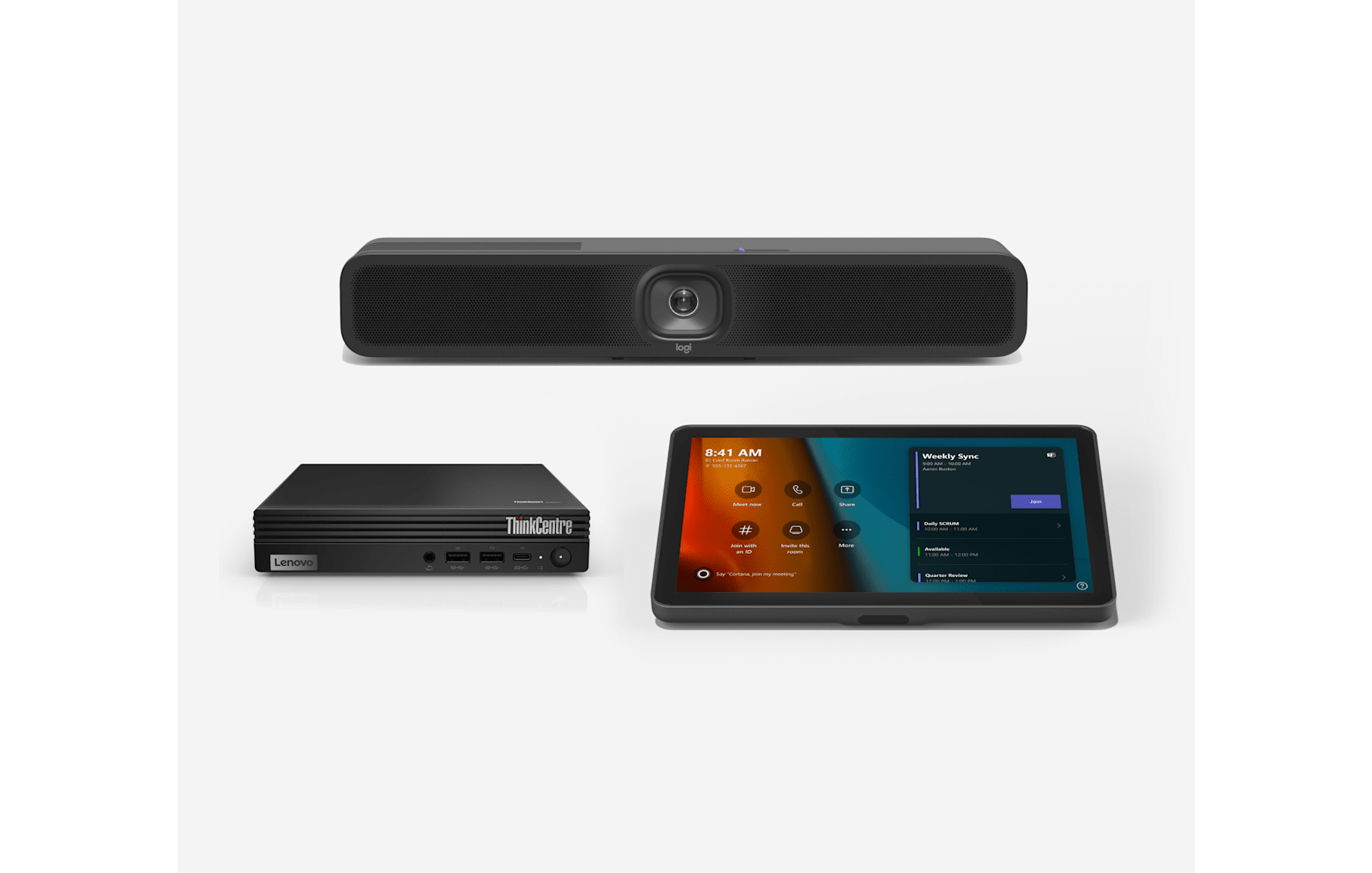
Depending on the room, the solution could include a conference camera, speakerphone, dedicated video bar, or a complete meeting room system. However, buying a larger system will not automatically improve meetings if the room is small or the existing equipment already meets the team’s needs.
Interactive displays and digital signage
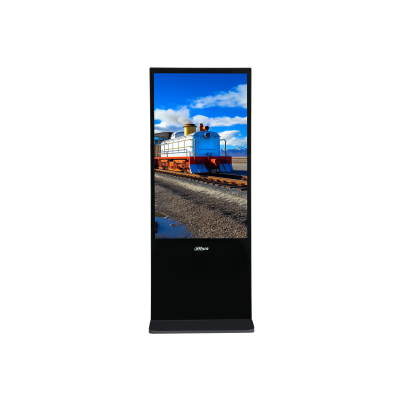
Interactive displays are useful for collaborative meetings, presentations, training, and annotation. Digital signage, on the other hand, is designed to display messages, announcements, menus, or promotional content to an audience.
Brands such as Samsung and MAXHUB offer display products for different professional settings. Dahua also serves the professional display and security technology market. Compare the specific product’s capabilities rather than assuming every display from a particular brand is designed for the same purpose.
Essential office peripherals
Keyboards, mice, adapters, and other peripherals can be sensible purchases when existing accessories are worn out, unreliable, or incompatible with newer computers. Nevertheless, buying spare accessories simply because they are discounted can tie up funds that would be better spent on more important equipment.
-
- Vt Flow
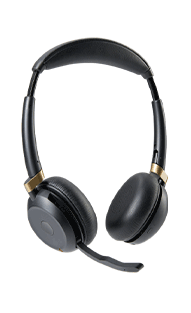
-
- Logitech video bar, a Lenovo ThinkCentre mini PC, and a touch controller console
-
- Dahua Digital signage
Which Business Headsets Are Worth Buying?
The best headset for business calls is the one that delivers clear communication, comfortable daily use, and reliable compatibility at a reasonable total cost. Wired models can suit fixed workstations, while wireless headsets are useful for staff who move around or need greater flexibility.
For a Nigerian business comparing headset deals, the first step is to identify how employees work.
Wired versus wireless headsets
Feature | Wired headset | Wireless headset |
Connectivity | USB, 3.5 mm, or another supported cable connection | Bluetooth, DECT, or a dedicated wireless receiver |
Movement | Limited by cable length | Greater freedom of movement |
Charging | Usually not required | Battery charging is required |
Connection reliability | Avoids wireless interference, but depends on cable and port condition | Depends on signal, receiver, battery, and environment |
Typical use | Fixed desks and shared workstations | Hybrid work, mobile professionals, and flexible desks |
Cost considerations | Often less expensive to purchase | May cost more depending on features and design |
Neither option is automatically better. For a team that spends most of the day at fixed desks, wired USB headsets may provide everything it needs. Meanwhile, wireless models can be worthwhile when employees need to move around during calls or connect to multiple supported devices.
What does noise cancellation mean in a business headset?
Noise cancellation can refer to two different functions. Active noise cancellation (ANC) reduces surrounding sounds that the wearer hears through the earcups, while a noise-cancelling microphone helps reduce unwanted background noise transmitted to the person on the other end of the call.
This distinction matters in busy Nigerian offices where conversations, printers, fans, and other background sounds may affect calls.
A headset with ANC does not necessarily have the best microphone for customer service. Therefore, buyers should check both functions independently.
Headset options to compare
Promallshop’s business headset catalogue includes products such as the Logitech H390, Logitech H570e, VT6200UNC-D, VT9800, Logitech H800, VTX300 BT Duo VT, VTB320-D, Logitech Zone Wireless UC, and Dell WL5022. These are examples to evaluate, not a claim that every model will receive a Black Friday discount.
Consider the following when shortlisting models:
- Logitech H390: A wired USB option to consider for everyday office calls.
- Logitech H570e: A business-focused wired headset option for users who need a dedicated microphone.
- VT6200UNC-D: A wired model to evaluate for professional communication and call centre use.
- VT9800: A wireless Bluetooth option for users who need additional mobility.
- Logitech H800: A wireless option for supported office and remote-work setups.
- VTX300 BT Duo VT and VTB320-D: Options to compare when evaluating wireless connectivity and features for professional calls.
- Logitech Zone Wireless UC and Dell WL5022: Business wireless models to compare against your team’s comfort, connectivity, and budget requirements.
The final decision should depend on the exact model specifications, available stock, current pricing, warranty, and compatibility. A familiar brand name alone does not guarantee the right fit.
How much should a business spend on headsets?
There is no single correct budget for every organisation. A small team buying basic wired headsets has different requirements from a contact centre equipping dozens of agents for extended daily use.
Instead of setting the budget around the most expensive model, calculate the cost per employee and the expected service life. Then compare how much each option offers in comfort, call quality, connectivity, and support.
For example, a team of 20 employees purchasing headsets at ₦50,000 each would spend ₦1,000,000 before any additional costs. A 10% discount would save ₦100,000, provided the discount applies to a genuine comparable price.
The same calculation helps procurement officers evaluate bulk orders without letting the advertised percentage dictate the decision.
Office Technology You Should Skip
A Black Friday deal is not worth taking if the product does not solve a real problem, lacks essential compatibility, or costs more to maintain than the business can justify. Sometimes the best purchasing decision is to postpone an upgrade and keep using equipment that still performs reliably.
Cheap products that do not meet business needs
A low-priced headset may be unsuitable for employees handling customer calls all day. Likewise, a display may have an attractive price but lack the connectivity, brightness, or collaboration features required by your workplace.
Do not judge products by price alone. Check whether the specifications match the job.
Premium features nobody will use
Advanced wireless features, sophisticated controls, or expensive collaboration systems may be useful in the right environment. However, they are unnecessary if employees will never use them.
For instance, a small office with fixed workstations may not benefit enough from premium wireless headsets to justify buying them for every employee.
Equipment that is incompatible with existing systems
A discounted device can become an expensive mistake if it does not work with your computers, desk phones, conferencing platform, mounting system, or other installed equipment.
Before purchasing, verify supported operating systems, connection types, software requirements, and any accessories needed for installation.
Outdated or poorly supported technology
Avoid products with unclear warranty coverage, unavailable replacement parts, uncertain software support, or specifications that no longer meet your business requirements.
A particularly large discount should prompt additional checks, not an automatic purchase.
Upgrades that can wait
If the existing equipment is reliable and there is no clear operational benefit to replacing it, postponing the purchase may be the smarter decision. Keep the money available for a genuine business priority instead.
A useful rule: If you cannot explain what problem the product will solve, who will use it, and why the current equipment is insufficient, it probably does not belong at the top of your Black Friday list.
How to Tell Whether a Black Friday Deal Is Worth It
A genuine bargain combines a credible price reduction with a suitable product, trustworthy seller, clear purchase terms, and acceptable after-sales support. Comparing the exact model and its total ownership cost is more useful than comparing percentage-off labels alone.
Record the current price
Start by recording the product’s price before the promotion. Where possible, check the price over time and compare offers for the same model from other reputable sellers.
A discount percentage is meaningful only when the original price is a credible comparison point.
Compare equivalent products
Compare like with like. Two headsets may have different microphone designs, connectivity options, battery performance, comfort, and support arrangements.
Similarly, two displays of the same size may differ significantly in resolution, brightness, touch capability, and built-in software.
Calculate the total cost of ownership
The total cost may include more than the advertised purchase price.
Consider:
- Product price after discount.
- Delivery and installation.
- Required cables, mounts, adapters, or accessories.
- Staff training or configuration.
- Maintenance and replacement parts.
- Any recurring software or service costs.
For meeting room equipment, installation and compatibility can make a significant difference to the final cost.
Verify the seller and warranty
Confirm the seller’s identity, invoice arrangements, warranty coverage, return terms, and after-sales support. For business purchases, keep the quotation, invoice, payment confirmation, and relevant product documentation.
The Federal Competition and Consumer Protection Commission (FCCPC) provides guidance on consumer rights and responsibilities. Its guidance highlights the importance of accurate product information and consumer protections. Read the applicable terms rather than assuming every promotional purchase has identical return conditions.
Check availability and delivery
Before paying, confirm that the exact model is available and establish the expected delivery date. If the equipment is needed for a new office, project, or year-end deployment, late delivery can reduce the value of the discount.
For purchases involving multiple offices or countries, confirm delivery coverage and local support separately.
How to Plan Your Office Technology Budget
A practical Black Friday budget starts with operational priorities, not the number of attractive deals available. Separate essential replacements from productivity improvements and optional upgrades, then allocate funds according to urgency, expected use, and the cost of leaving existing problems unresolved.
Use a simple priority system
Priority | Type of purchase | Example |
High | Equipment failure or serious operational problem | Replacing headsets that make customer calls difficult |
Medium | A measurable productivity improvement | Improving an under-equipped meeting room |
Low | Optional convenience or aesthetic upgrade | Replacing functional peripherals solely for appearance |
This system helps procurement teams explain spending decisions to management. It also reduces the temptation to use a budget simply because money has been allocated.
A worked example for a small business
Imagine a company has ₦2 million available for office technology purchases.
It could reserve ₦1 million for essential replacements, ₦600,000 for a planned meeting room improvement, and ₦400,000 as a contingency for installation, accessories, or other approved needs.
These figures are illustrative, not recommended spending ratios. The appropriate allocation depends on the company’s needs, staff numbers, and existing equipment.
Before approving each item, ask whether it reduces a current problem, whether the specification is suitable, and whether the business can support the device throughout its useful life.
Buy for the whole team, not just the headline price
Bulk buying can improve consistency across a team, but it should follow a compatibility and user-needs assessment. Where possible, test a sample before committing to a large order.
For example, a call centre could trial two suitable headset models with a small group of agents, compare comfort and call clarity, and then choose the better fit for the wider team. This is more reliable than selecting the cheapest option from a catalogue without testing it.
Black Friday Buying Mistakes to Avoid
The most common mistakes include purchasing without a plan, trusting advertised discounts without checking prices, overlooking compatibility, and ignoring the full cost of ownership. A few basic procurement controls can help businesses avoid unnecessary spending and reduce the risk of buying unsuitable equipment.
Watch out for these errors:
- Buying because of urgency. A countdown timer does not make a product necessary.
- Ignoring specifications. A cheaper model may lack a feature your workflow depends on.
- Assuming every discount is genuine. Compare the exact model and its normal selling price.
- Overlooking warranty terms. Verify what is covered, for how long, and by whom.
- Forgetting installation costs. Mounts, cables, configuration, and labour can affect the total.
- Ordering without checking stock. Confirm availability and delivery timelines before committing.
- Choosing a brand instead of a suitable product. Compare individual models, not just manufacturer names.
- Buying more units than needed. Estimate actual demand before placing bulk orders.
- Ignoring employee feedback. Staff who use headsets and collaboration tools daily can identify practical issues.
- Skipping documentation. Keep records of approved specifications, quotations, invoices, and warranties.
A useful expert tip: evaluate the cost of doing nothing
A purchase can be justified even when the discount is modest if the existing equipment is causing recurring problems.
For instance, if unreliable audio forces employees to repeat information throughout the day, the resulting delays can affect customer experience and staff productivity. Compare those operational costs with the price of a suitable replacement.
However, avoid inventing savings figures without evidence. Where possible, use actual complaint records, support tickets, repair costs, or employee feedback to establish the scale of the problem.
A Practical Black Friday Buying Checklist
Use this checklist before approving a purchase. It turns a promotional offer into a procurement decision that can be reviewed, justified, and tracked.
- Identify the business problem the product will solve.
- Confirm the number of employees or locations that need the equipment.
- Set a budget before comparing offers.
- Verify the exact product model and specifications.
- Check compatibility with existing devices and software.
- Compare the promotional price with credible alternatives.
- Calculate delivery, installation, and accessory costs.
- Confirm stock and expected delivery dates.
- Review warranty, return, and after-sales support terms.
- Verify the seller and retain the purchase documentation.
- Obtain the necessary approval for the order.
- Record the final price and expected business benefit.
For larger purchases, include a short written justification that explains why the equipment is needed, why the selected model is suitable, and how the team will evaluate its performance after installation.
What Businesses Should Know About Office Technology Trends
Office technology purchasing is increasingly shaped by hybrid work, collaboration needs, and the demand for clearer communication. However, businesses should evaluate each development according to its practical benefits rather than treating every new feature as essential.
Better audio for hybrid work
Business headsets continue to serve an important role in remote meetings, contact centres, and shared offices. Features such as microphone noise reduction, device switching, and comfortable earcups can be valuable where employees spend long periods on calls.
Nevertheless, the best feature set depends on the user’s work. A fixed-desk employee may need a reliable wired headset, while a mobile professional may benefit from a supported wireless model.
More integrated meeting rooms
Businesses are adopting conferencing equipment that brings cameras, microphones, speakers, and collaboration controls together. This can simplify meeting-room use, provided the equipment suits the room size and works with the organisation’s chosen conferencing platform.
Before upgrading, assess how often the room is used, the number of participants, existing audio problems, and the installation requirements.
Interactive collaboration and digital signage
Interactive displays can support shared presentations, brainstorming, and training. Meanwhile, digital signage helps businesses communicate information in reception areas, retail spaces, offices, and other public-facing environments.
These are different use cases. A business should not purchase an interactive display when a standard signage screen would meet its requirements, or buy a signage display when employees need touch-based collaboration.
More deliberate procurement
As businesses manage technology budgets carefully, standardising equipment and considering long-term support can be just as important as finding a lower purchase price.
A consistent headset model, for example, may simplify deployment and staff support. However, standardisation should not override genuine differences between roles or accessibility needs.
Ultimately, the most useful technology trend is the one that helps your business work more effectively without adding unnecessary complexity.
Conclusion
Black Friday 2026 gives Nigerian businesses an opportunity to review their office technology needs before the new year. Business headsets, video conferencing equipment, interactive displays, digital signage, and essential peripherals may all be worthwhile purchases when they solve a genuine problem and offer good long-term value.
At the same time, businesses should skip unnecessary premium features, incompatible devices, questionable discounts, and equipment that does not justify its cost. By comparing exact specifications, verifying sellers, reviewing warranty terms, and calculating the total cost of ownership, procurement teams can make better decisions.
The goal is not to buy the most equipment during Black Friday. It is to buy the right equipment at a price that makes sense for the business.
FAQs
Black Friday 2026 falls on Friday, 27 November. However, Nigerian retailers may start promotions earlier in November or extend them beyond the date, so check each retailer's announced sale period and product-specific terms.
Business headsets, video conferencing equipment, interactive displays, digital signage, and essential peripherals can be worthwhile purchases. Prioritise equipment that addresses a genuine workplace need, then compare specifications, price, compatibility, and warranty coverage.
They can be, provided the promotional price represents a genuine saving on a suitable product. Compare the exact model's previous price and competing offers, and include delivery, installation, accessories, and support costs before deciding.
The best headset depends on call volume, background noise, employee comfort, connectivity, and compatibility with the call centre's systems. Wired USB models may suit fixed workstations, while wireless models can benefit employees who need more mobility.
Neither is universally better. Wired headsets avoid battery charging and may suit fixed desks, while wireless headsets provide greater movement. Compare connection reliability, battery life, microphone performance, comfort, and total cost before selecting either type.